
How do I check door alignment for my smart lock?
To check for proper door alignment on your Halo, Aura, or Halo Touch smart lock, first try manually locking and unlocking your smart lock with the door open, and then again with the door closed. If there is resistance or jamming when the door is closed, then there may be an alignment issue between the door bolt and the hole on the strike plate.
Try the following troubleshooting steps:
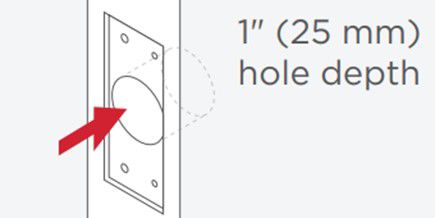
1. Ensure the top strike has proper hole depth in the door frame.
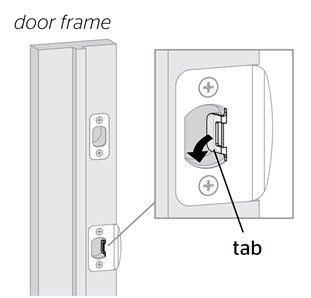
2. Use a screwdriver to bend the tab on your bottom strike until the door latches properly and the door bolt better aligns with the hole on the top strike plate.
3. Confirm that your door thickness is supported:
- Halo Touch / Touchscreen / Keypad: 1-3/8" to 2”
- Aura: 1-3/8" to 2”
4. Check your door’s weatherstripping to ensure that it is not impeding the door alignment. Adjust the weatherstripping if necessary.
5. Check for overtightened bolts. Remove interior trim and subassembly, loosen thru bolts, reinstall without overtightening the bolts.
6. Stand inside and close your door, manually lock the smart lock without applying force to push or pull the door. If the door locks smoothly, your alignment issue has been resolved. If the door does not lock smoothly, please call Customer Support at 1-800-327-5625
